

Product · 10 min read
GSEQ: Free Software for the Analysis of Interaction Sequences
Download GSEQ free software for sequential behavioral analysis - learn its lag sequential analysis, SDIS format, interobserver agreement tools, and INTERACT integration.
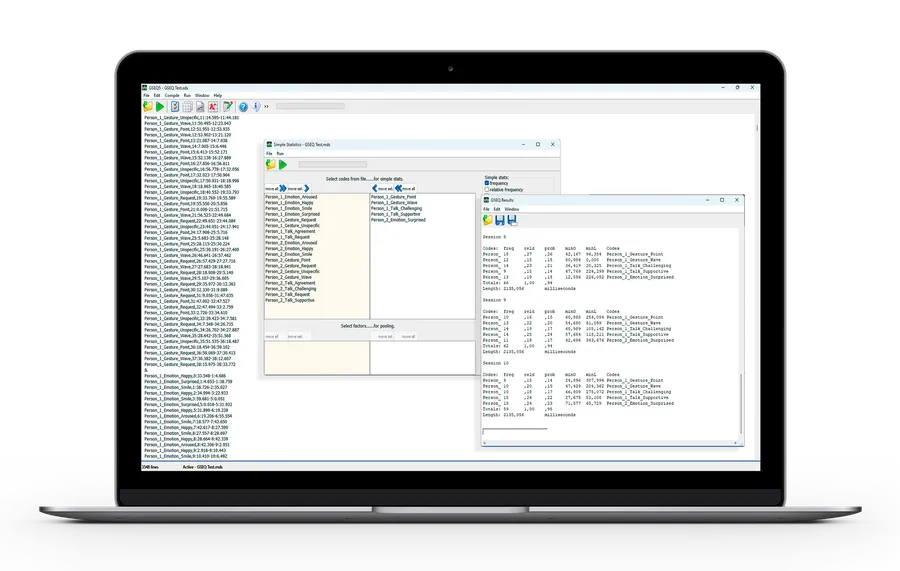
Introduction to GSEQ
GSEQ (Generalized Sequential Querier) is a powerful program for analyzing sequential observational data in behavioral research fields including psychology, education, and human interaction studies. GSEQ 5, the current version, features an intuitive Windows interface and remains free for academic and research use.
This page provides everything you need to get started: the download links, the data format GSEQ works with, and how Mangold INTERACT fits into a complete research workflow.
Download GSEQ and Related Tools
Below are direct download links for GSEQ, as well as complementary conversion and analysis utilities. All programs remain free and are provided as-is for academic, research, or personal use.
Version 5.1 includes new algorithms for computing interobserver agreement, both for event and timed-event sequential data, described in:
Bakeman, R., Quera, V., & Gnisci, A. (2009). Observer agreement for
timed-event sequential data: A comparison of time-based and event-based
algorithms. Behavior Research Methods, 41 (1), 137-147.
Quera, V., Bakeman, R., & Gnisci, A. (2007). Observer agreement for
event sequences: Methods and software for sequence alignment and
reliability estimates. Behavior Research Methods, 39 (1), 39-49.
Note: The MDS file format for GSEQ 5 differs from
earlier versions. Earlier SDS files need to be recompiled for use with
version 5.
Installation Instructions: Unzip and run the setup to install the program. Thereafter, to run GSEQ, click Start > Programs > GSEQ5 > GSEQ 5.1, or click on the GSEQ desktop icon.
ObsTxtSds (Noldus’ The Observer to SDIS converter) converts Version 6 and later Noldus’ The Observer data files into SDIS files that can be subsequently analyzed by GSEQ.
Described in: Bakeman, R., & Quera. V. (2008). ActSds and OdfSds: Programs for converting INTERACT and The Observer data files into SDIS timed-event sequential data files. Behavior Research Methods, 40 (3), 869-872.
Installation Instructions: Unzip and run the program directly without installation. See the included PDF file describing the program.
A standalone program for aligning event sequential data by means of dynamic programming algorithms, and computing an alignment kappa.
Described in: Quera, V., Bakeman, R., & Gnisci, A. (2007). Observer agreement for event sequences: Methods and software for sequence alignment and reliability estimates. Behavior Research Methods, 39 (1), 39-49.
Note: the ELign algorithm is included in GSEQ 5 as well; using GSEQ 5 for aligning event sequences and computing Kappa is easier than using ELign.
Installation Instructions: The ZIP file contains the executable file, ELign.exe, plus several sample SDIS data files. Unzip and run the program directly without installation. See the included PDF file describing the program.
A standalone program for log-linear analysis. Log-linear analysis can be useful for analyzing event sequential data in particular, as described in Chapter 11 of Bakeman and Quera (2011). GSEQ’s Export N-way table utility writes files that can be read directly by ILOG. ILOG uses an Iterative Proportional Fitting (IPF) algorithm to estimate expected frequencies.
The current version is ILOG 4; an earlier DOS version was described in: Bakeman, R., & Robinson, B. F. (1994). Understanding log-linear analysis with ILOG: An interactive approach. Hillsdale, NJ: Erlbaum.
Installation Instructions: The ZIP file contains the executable, ILOG4.EXE, and a PDF file that describes the program. Unzip and run the program directly without installation. See the included PDF file describing the program.
Getting Your Data Into SDIS Format
GSEQ reads data in the SDIS format. You can write SDIS files by hand, but for anything beyond small datasets this quickly becomes tedious and error-prone. Every onset, every offset, and every code has to be typed and kept consistent.
This is where Mangold INTERACT fits in. You code behavior directly from video and audio in Mangold INTERACT and then launch GSEQ straight from there. The coded data is passed to GSEQ in SDIS format automatically, with no manual export or conversion step in between. You keep GSEQ for its sequential statistics and let Mangold INTERACT handle the coding and the file format. Nothing about GSEQ changes. You simply skip the manual SDIS work.
Integration with Mangold INTERACT
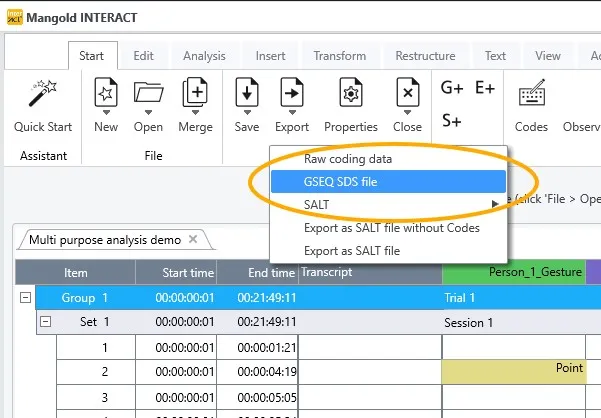
GSEQ stays free and fully functional on its own. If you also work with video or audio recordings, Mangold INTERACT removes the most tedious step in the GSEQ workflow: preparing the data.
-
Direct Handover to GSEQ:
Mangold INTERACT passes your coded behavioral observation data directly to GSEQ in SDIS format. You can call GSEQ straight from Mangold INTERACT, so there is no separate conversion step before the sequential analysis. -
Comprehensive Video & Audio Coding in Mangold INTERACT:
Before you use GSEQ’s advanced statistical routines, you can take advantage of Mangold INTERACT’s strengths in media handling. Mangold INTERACT supports synchronous playback of multiple video and audio files, letting you collect, code, and annotate large volumes of footage. It also provides:- Thorough reliability checks (to ensure consistent coding among different observers).
- Flexible sampling methods (event, time, one-zero, or pinpoint sampling).
- Extensive visualization tools (timeline charts, state-space grids, and more).
- Python integration for custom data transformations and further analysis if needed.
-
Extending GSEQ’s Power:
Once data are exported from Mangold INTERACT, GSEQ’s specialized sequential analysis tools (lag sequential analysis, contingency tables, Yule’s Q, adjusted residuals, and more) can delve deeply into the temporal structure of observed behaviors. Researchers thus gain a dual advantage: expert-level media handling and coding from Mangold INTERACT, plus GSEQ’s proven, robust sequence analysis for precise statistical insights. -
Workflow Efficiency:
Because both tools operate seamlessly together, repeated imports, exports, and conversions are minimized. You can maintain video recordings, observer codes, intervals, and behaviors as you transition from coding to analysis. Researchers with large datasets or multifaceted behavior codes particularly benefit from the combined workflow.
Those interested in exploring the entire range of observational research capabilities, such as video annotation, advanced reliability analysis, specialized data visualization, and sequence alignment, are encouraged to consider Mangold INTERACT as a complementary platform to GSEQ.
Mangold INTERACT: One Software for Your Entire Observational Research Workflow
From audio/video-based content-coding and transcription to analysis - Mangold INTERACT has you covered.


GSEQ Software Details
Overview
The Generalized Sequential Querier is a computer program for analyzing sequential observational data. It computes a variety of simple and contingency table statistics. Simple statistics include frequencies, rates, durations, and proportions (percentages).
Statistical Capabilities
Table statistics include joint frequencies, adjusted residuals, chi-squares and, for 2x2 tables, Yule’s Q and odds ratios. Statistics can be computed for various lags, and separately for each session or pooled over sessions, levels of a factor, or both.
SDIS Format
The Sequential Data Interchange Standard is a language for describing sequential data as obtained through direct observation of individuals, interacting dyads, or groups. GSEQ includes a compiler for SDIS-formatted data files that converts them into MDS files (modified SDS files), which are then analyzed with the various analytic procedures included in GSEQ.
Data Input Options
Data can be entered manually into SDIS files, or converted from other data formats such as those used in Mangold INTERACT and Noldus’ The Observer videoanalysis software using our standalone utilities ActSds, OdfSds (The Observer Version 5 and earlier), and ObsTxtSds (The Observer Version 6 and later).
Data Modification
GSEQ’s data modification capabilities expand analytic possibilities. New codes can be created from existing ones using standard logical operations (e.g., and, or, not) or by recoding, lumping, and chaining. The window command is especially useful. It lets you define new codes (windows) that are tied to onsets and/or offsets of existing codes and, in particular, perform time-window sequential analyses.
Exportation
A major use of GSEQ is to produce statistics for export that are then analyzed by standard statistical packages such as SPSS or SAS or by standard spreadsheet programs such as Excel. More generally, GSEQ’s output consists of simple tab-delimited text files that can be read into and manipulated by almost any spreadsheet program.
Additional Features
GSEQ also includes helpful data plotting routines and procedures for assessing interobserver agreement with event-based and time-based kappas.
GSEQ Program and Book
The current version is GSEQ 5, a new and significantly improved version of GSEQ. It runs under Windows and on other operating systems that run Windows simulation software.

GSEQ 5 is described in the following key publication:
Bakeman, R., & Quera, V. (2011). Sequential Analysis and Observational Methods for the Behavioral Sciences. Cambridge, UK: Cambridge University Press. ISBN: 9781107001244 (hdcv), 9780521171816 (ppbk).
Link: Cambridge University Press, Link: Amazon.com
Earlier DOS-based GSEQ versions were covered by:
Bakeman, R., & Quera, V. (1995). Analyzing Interaction: Sequential Analysis with SDIS and GSEQ. Cambridge, UK: Cambridge University Press. ISBN: 0-521-44451-9 (hdcv), 0-521-44901-4 (ppbk)
The SDIS specification itself was first introduced in:
Bakeman, R., & Quera, V. (1992). SDIS: A sequential data interchange standard. Behavior Research Methods, Instruments, and Computers, 24, 554-559.
Version History
- 1995-1996: DOS versions 1.1 (English) and 1.2 (Spanish) were published.
- 1996: DOS version 1.4 (bilingual English/Spanish). It included several enhancements and bug fixes.
- 1997: DOS version 2.0 (bilingual English/Spanish). It included major changes such as a new data type in the SDIS language (multievent sequences), more features in the data language itself, a new and more efficient binary format for compiled files (MDS 2.0), full integration of program PLOT in the SDIS-GSEQ User Interface, enhanced exportation capabilities, and so on.
- 1997-2000: Prototype GSW (GSEQ for Windows) versions 3.x. Multilingual (English/Spanish/Italian). It ran in Windows 95 or later. The user interface was, of course, completely new, and included a command composer, MDS file displayer and plotter, and tools for computing observer agreement indexes. SDIS specifications were enhanced.
- 2001: GSW (GSEQ for Windows) version 4.0 is released. It includes several enhancements in analysis commands, and a new HTML help system.
- 2002: GSW (GSEQ for Windows) version 4.1 is released. Memory size is increased (bigger lag tables can be requested, more codes can be specified in data modification commands, codes and labels can contain more characters, and so on), and the HTML Help system is updated.
- 2006: Protection is removed from GSW 4.1.2, so that the Windows version no longer needs a key file from the original DOS program.
- 2007: New versions GSW 4.1.3, 4.1.4 and 4.2.0, with some bugs fixed.
- 2008: New version GSW 4.2.0, for Windows Vista and older Windows versions.
- 2008: Transitional version GSW 4.5.0 to 5.0.
- 2009: New version GSEQ 5.0, completely reprogrammed for current versions on Windows. It includes new algorithms for observer agreement, and a new Help system. GSEQ 5 uses point-and-click for data modification and analysis, not command files as in earlier versions. It also supports batch processing (command files) for data modification commands.
- 2011: New version GSEQ 5.1, with a streamlined interface and a new utility for exporting multidimensional lag tables.
- 2013: Version 5.1.15, with an updated look, minor bug fixes, and some enhancements (e.g., the kappa routine provides code-wise kappas, the window data modification command can accept two codes).
- 2016: Version 5.1.23, with a new logo and minor bug fixes.
- 2019: Transfer of maintenance and further development for all of the above programs to Pascal Mangold
Contact & Feedback
Mangold International welcomes all questions, suggestions, and bug reports. Researchers are encouraged to share:
- Which version of GSEQ is being used.
- When usage began.
- Brief details on the research area or project.
- Observational data collection tools in use (e.g., Mangold INTERACT, The Observer).
- Desired features or improvements to GSEQ.
For general inquiries about GSEQ and its integration with Mangold INTERACT, please reach out to:
- Pascal Mangold - Email Pascal Mangold
- Roger Bakeman - bakeman@gsu.edu - ResearchGate
- Vicenç Quera - vquera@ub.edu - ResearchGate
FAQ - Frequently Asked Questions
What is GSEQ and what is it used for in behavioral research?
Is GSEQ free to download and use?
What data format does GSEQ use for sequential behavioral data?
Can I use GSEQ without Mangold INTERACT?
How do I get my coded video data into GSEQ?
How does GSEQ integrate with Mangold INTERACT for sequential analysis?
What statistical analyses can GSEQ perform on observational data?
Can GSEQ results be exported to SPSS, SAS, or Excel?
Mangold INTERACT: One Software for Your Entire Observational Research Workflow
From audio/video-based content-coding and transcription to analysis - Mangold INTERACT has you covered.