
Multimodal Study Platform
Mangold Observation Studio

- Synchronized Multimodal Data
- Modular Study Workflows
- On-Premise Operation
Why Mangold Observation Studio
Your Study Data. Your Study Environment.
Mangold Observation Studio builds on more than 35 years of experience in capturing and analyzing audio, video and sensor data in sync.
Instead of examining isolated recordings and data files, you explore all synchronized streams together.
Mark relevant events and select meaningful time segments across video, audio and recorded signals. Focus subsequent analysis and data exports on the parts of an experiment that matter most.
Whether you are studying a reaction to a commercial, an interaction with a digital interface or an important event in a behavioral experiment, with Observation Studio you connect the data with the moment it occurred.
What Mangold Observation Studio Does for Your Studies
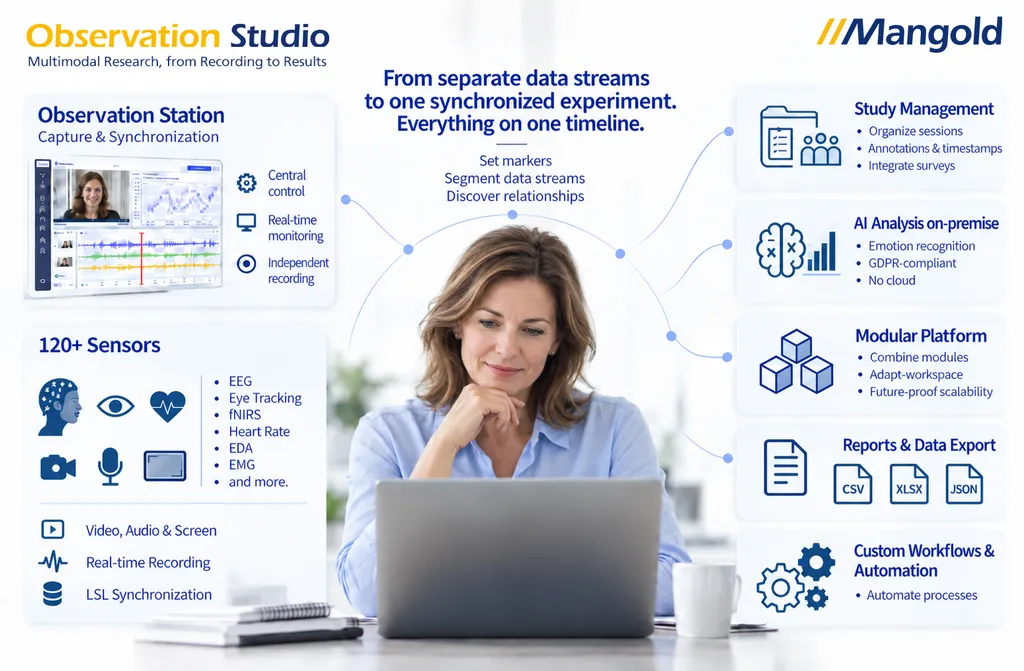
Mangold Observation Studio captures and synchronizes every data stream of an experiment in one platform.
Record Participants in Parallel or in Sequence
Record data from a theoretically unlimited* number of participants, in parallel, in sequence or a mix of both. That saves time and enables studies in which several people work on a topic together at the same time.
Capture Multiple Data Streams in Sync
Capture different data streams from your participants simultaneously during an experiment, including from more than 120 sensors and devices of other manufacturers via the LSL protocol*.
Keep 100% Data Sovereignty
All study data in Observation Studio is stored exclusively on your local systems. That keeps you in full control at all times and lets you comply with data protection regulations.
On-Premise AI Emotion Analysis
Have participants’ facial expressions analyzed automatically by an AI emotion analysis that runs locally on your hardware.
Manage Studies Effortlessly
Access all recorded sessions with a mouse click through an intuitive interface. Playing back, organizing and analyzing many data streams at once becomes as easy as in probably no other environment.
Add Annotations at Any Time
Mark important moments during recording or in a later review with individual markers, so you can find any point again easily and segment the data for exports and analyses.
Navigate Your Data Efficiently
Jump effortlessly between key events with marker-based controls to gain deeper insights at specific points quickly.
Stay in Control of All Raw Data
When you need access to the raw data, export it as CSV files with a few clicks and continue using it in other applications.
* Within technical feasibility.
Works with: Mangold INTERACT Highlight Movie Creator Mangold VideoSyncPro
Study Example
See Observation Studio in Action.
Which Commercial Creates the Strongest Response?
Illustrative demonstration studyIn a demonstration study, four participants viewed different commercials while Observation Studio synchronized webcam, screen, EEG and skin conductance recordings.
The study team could then examine physiological responses, explore stimulus-related moments and compare results across participants using interactive reports.
The study illustrates how synchronized recordings become the foundation for meaningful multimodal analysis.
Go Beyond Recording. Turn Data into Insights.
Optional analysis and reporting modules help you investigate physiological and behavioral responses, compare observations and explore how participants respond to specific stimuli and events.
Stimulus Presentation & Input
Experiment Designer & Experiment Presenter
Design your experiment and present stimuli such as images, videos or websites. Stimuli, sociodemographic data and other input entered during the experiment flow directly into the Multimodal Insights & Comparison Report.
Individual Analysis Modules
GSR Response Analysis
Explore Physiological Arousal.
Calculate skin conductance responses and generate reports to examine changes in physiological arousal during recorded events and stimuli.
ECG Analysis
Examine Heart Activity and HRV.
Analyze heart rate and heart rate variability (HRV) from supported PPG or ECG recordings and generate reports for physiological studies.
AOI & Gaze Analysis
Understand Visual Attention.
Define Areas of Interest and examine how participants visually engage with relevant elements of a stimulus or interface.
EEG Report
Examine Brain Activity in Context.
Generate reports from your synchronized EEG recordings and examine brain activity in relation to stimuli, events and marked segments.
Emotion Analysis
Understand Facial Expressions.
Analyze facial expressions from webcam recordings with AI that runs on-premise, and examine changes in relation to stimuli and events.
+ other licensed measures, where supported
Multimodal Insights & Comparison Report
All Your Analysis Results. All Participants. One Interactive Report.
Bring together the results from all your analysis modules in one comprehensive, interactive report.
Explore and compare results across participants, filter insights by individual stimuli or marker-defined segments, and discover how different measurements relate to each other.
Go beyond individual sensor analyses with integrated multimodal analysis, combining results from different sensors into a synchronized view of participant responses.
From individual measurements to the bigger picture — all in one interactive report.
-
Unified Analysis Results
All available results from the licensed analysis modules, consolidated in one interactive report.
-
Cross-Participant Comparison
Explore and compare analysis results across all recorded participants.
-
Stimulus & Segment-Based Exploration
Filter results by presented stimulus or marker-defined segment to focus on specific events in your study.
-
Integrated Multimodal Analysis
Combine results from different sensors and explore their relationships in a synchronized, multimodal analysis view.
Even More Insight with the Experiment Designer
The report works with any recording. If you present your stimuli with the Mangold Experiment Designer, the report shows them automatically and offers more: dedicated views for video stimuli and filters by sociodemographic data or other input that was presented or entered during the experiment. This goes far beyond showing stimuli in an external tool and capturing a single screen recording of the entire session.
Conceptual illustration; the available analysis content depends on the licensed modules and recorded measures.
Analysis modules are optional and require appropriate recording sources and licenses.
Configure Your Mangold Observation Studio
Every study is different. Select the recording and analysis capabilities your study requires and you will receive a quote for exactly the configuration you need.
1. Core System — Included
Observation Studio Core with one Participant Station
Mangold Observation Studio Core
Central software that records video, audio and sensor data from the Participant Stations on your network.
Participant Station (1 included)
Runs on each test computer and transmits its data to Observation Studio. Installs on almost any computer that meets the requirements of the selected sources.
Included
- Webcam Recording – Capture the participant’s facial expressions and verbal feedback.
- Screen Recording – Capture the participant’s screen activity.
- Keyboard & Mouse Recording – Record the participant’s keyboard and mouse interactions.
- Viewing, recording, saving, loading, replay and session management
- Markers and synchronized segments
- Raw data access
- Multimodal CSV export across streams and participants
- Data transfer to Mangold INTERACT
2. Additional Recording Sources
Add Participant Stations and supported devices. Recording a signal does not include its analysis; analysis modules are selected separately.
3. Analysis & Reporting
Optional modules. Each requires the matching recording source and its own license.
4. Additional Components
Optional extensions for workflows and video.
Your Configuration
You will receive a quote for the core system and all components you selected above in sections 1 to 4.
Ready to Connect Your Study Data?
Discover how Mangold Observation Studio can support your next multimodal study, from synchronized recording to integrated analysis and reporting. Our team can help you identify the data sources, modules and workflows that fit your studies.
Frequently Asked Questions
What is Mangold Observation Studio?
Mangold Observation Studio is a multimodal study platform for screen-based experiments. It captures stimulus, screen, webcam and sensor data in sync, supports more than 120 devices via the Lab Streaming Layer (LSL) protocol, including eye trackers, EEG, ECG, fNIRS and GSR, and offers optional analysis modules, including AI emotion analysis from facial expressions that runs on-premise.
What is included in Mangold Observation Studio?
The core system includes the central Observation Studio software for viewing, recording, saving, loading, replay and session management, plus one Participant Station. The Participant Station records webcam, screen, keyboard and mouse activity on a synchronized timeline. You can set markers, segment recordings across data streams, access raw data, export multimodal CSV datasets across streams and participants, and transfer data to Mangold INTERACT.
Which devices and streams can be recorded?
Webcam, screen, keyboard and mouse recording are included with every Participant Station. Optionally, you can add compatible Shimmer GSR, PPG and motion sensors as well as Tobii and VT3 Mini eye trackers. Selected external streams, such as supported EEG systems and other LSL sources, can be integrated where technically compatible and appropriately licensed. Via the LSL protocol, more than 120 devices can be connected in principle, including Brain Products EEG, Tobii eye trackers, Pupil Labs, BioSemi, NIRx fNIRS, Shimmer, ANT Neuro, EGI, BrainVision, Cognionics, Emotiv and Bittium NeurOne. Compatibility of a specific device is checked before your project starts.
Can I study multiple participants simultaneously?
Yes. Mangold Observation Studio supports multi-participant studies with an essentially unlimited number of Participant Stations (within technical feasibility). Data from all participants is captured centrally and in sync, for example for team research, collaborative studies or research on learning behavior. One Participant Station is included in the core system; additional stations are licensed separately.
How are the data streams synchronized?
Each Participant Station captures the data of its computer, including webcam, screen and LSL sensors, and transmits it to the Observer Station. There, all data streams are brought onto one shared timeline, processed internally with a timestamp accuracy of 100 nanoseconds. The actual capture rate depends on the device used.
Can I analyze data directly in Observation Studio?
Yes, with optional analysis and reporting modules: GSR Response Analysis, ECG Analysis including HRV, AOI & Gaze Analysis, EEG Report and Emotion Analysis. The Multimodal Insights & Comparison Report brings the results of all licensed modules together in one interactive report. Each module is licensed separately and requires the matching recording source, for example a supported GSR, PPG or ECG sensor, an eye tracker or a compatible EEG system. Combined with the Experiment Designer, the report shows your stimuli automatically, offers dedicated views for video stimuli and lets you filter by sociodemographic data or other input collected during the experiment.
Can I compare results across participants?
Yes. With the optional Multimodal Insights & Comparison Report, you explore and compare the results of your analysis modules across all recorded participants, filter them by stimulus or marker-defined segment and combine results from different sensors in one interactive report.
Can EEG be recorded and analyzed?
Compatible EEG streams can be recorded in sync with video, screen and other signals as an optional, licensed data source. With the optional EEG Report, you examine the EEG data in relation to stimuli, events and marked segments. You can also export the synchronized EEG data together with your markers and segments for analysis in your preferred EEG software.
Does AI emotion analysis work offline?
Yes. The optional AI-based emotion analysis from facial expressions runs fully on-premise and in real time on your own hardware, with no cloud connection and no transmission of webcam data to external providers.
How do I integrate custom stimuli and surveys?
With the Mangold Experiment Designer, you define stimulus presentation and experiment flow, from a single website to randomized image and video sequences. An integrated survey module enables custom questionnaires whose data is directly linked with sensor and observational data. In the Multimodal Insights & Comparison Report, you can then filter results by sociodemographic data or other answers.
Can thinking aloud be combined with eye tracking and physiology?
Yes. The webcam captures participants’ speech and facial expressions in sync with stimulus, gaze data and sensors. That lets you analyze concurrent thinking aloud right next to gaze path and arousal. For retrospective thinking aloud, the recording can be reviewed together with the participant afterwards.
What can I do with my data after recording?
You can access the raw data, export multimodal CSV datasets across streams and participants, and focus exports on marked segments. Recordings can be transferred to Mangold INTERACT for further behavioral coding and analysis. With the optional Highlight Movie Creator, you can compile highlight videos of relevant moments.
Can Mangold Observation Studio be combined with other Mangold tools?
Yes. Recorded data can be exported to Mangold INTERACT for further behavioral coding and analysis. In addition, a comprehensive raw data export brings together all measures, devices and participants in one table. With the optional Highlight Movie Creator, you compile highlight videos, and Observation Studio can be integrated into Mangold VideoSyncPro recording setups.
Does Observation Studio require cloud processing?
No. Mangold Observation Studio is designed for local, on-premise operation. Recording, replay and the optional analysis modules run on your institution’s own hardware, so your recordings remain within your environment. How you meet data protection requirements for your study still depends on your institution’s policies and procedures.
How does Mangold Observation Studio differ from other multimodal study platforms?
The key difference is data processing: Mangold Observation Studio runs entirely on-premise on your own hardware, including the optional AI emotion analysis. For GDPR-compliant studies with sensitive participant data, that is a structurally sound foundation. In addition, recordings can be exported to Mangold INTERACT and coded there.
In which fields is Mangold Observation Studio used?
Mangold Observation Studio is used in market research and neuromarketing, user experience, usability testing, human-machine interaction, neuroscience, psychology, ergonomics, sports science, games research, team research, rehabilitation and biomedicine.