

· 2 min read
How to Install Mangold Software on macOS
Step-by-step guide to installing Mangold INTERACT and other products on macOS using the CodeMeter User Runtime and USB license key or soft-license code.
Mangold Software on macOS
Follow these steps if you want to run a Mangold Software on your macOS device.
Note: You may not be able to start INTERACT after installation if your licence is not valid for this latest version. In this case, please contact our team or ask in advance whether your existing licence is suitable for this latest INTERACT. Contact Us
1. Install required drivers
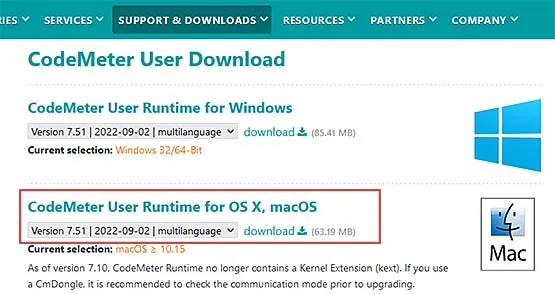
The CodeMeter User Runtime is required for all Mangold Software installations on macOS.
Download CodeMeter User Runtime- Click Download next to the macOS version
- Allow CodeMeter downloads
- Mount the CmRuntimeUser dmg by double-clicking the downloaded CodeMeter *.dmg file
- Double-Click the CmInstall.pkg file available on the disk image (dmg)
2. Check your USB License Key compatibility
Skip this step if you have a soft-license code (like “XXXX-XXXX-XXXX-XXXX”)
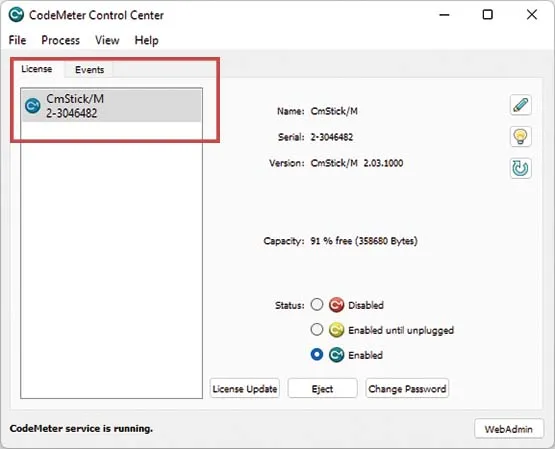
If you have a physical USB license key (“Dongle”), and use it on macOS for the first time, check its compatibility:
- Start the just installed CodeMeter Control Center app
- Insert the physical USB license key
- If the serial number of the stick is visible in the left pane, your USB license key is compatible
If nothing appears, your license key is not compatible; please contact support
3. Download and Install Mangold INTERACT
Follow the instructions in the linked PDF-file:
Open Instructions